Following the previous episode (/mo5-blog/days/day-6-rag-server/), I wanted to go one step further:
deploy my RAG server on the Internet.
The goal was twofold:
- make the server accessible from the outside
- allow coding agents (Copilot, Augment, etc.) to have a precise context to help with MO5 development (the project is described here: https://retrocomputing-ai.cloud/)
Deploying a RAG, but not just an API
To connect coding agents with my RAG server, I created an MCP server.
It acts as a standardized interface between AI tools (Copilot, Augment, etc.) and my RAG API.
In practice, setting up the MCP server was almost trivial.
I did not have to modify anything fundamental in the RAG, all the building blocks already existed.
The MCP server is neither a new engine nor a complex layer.
It is simply a specific interface / protocol that plays the role of an intermediary:
- it receives structured requests from the coding agent
- adapts them to the format expected by the RAG API
- returns responses in a format directly usable by the agent
All the intelligence therefore remains on the RAG side.
The MCP only translates and orchestrates.
Since I was exposing something on the Internet anyway, I did not want to deploy just a raw API.
With a domain name, I might as well use it to:
- host a small HTML site explaining how to configure MCP with Copilot or Augment
- properly expose the API
- document everything with Swagger
The MCP server sources, along with a Markdown page explaining how it works, are available here:
👉 https://github.com/thlg057/mo5-mcp-server
Hosting choice
I wanted to be able to deploy my Docker image easily.
Looking at what was available, I quickly ended up with VPS solutions.
After comparing prices and configurations, I chose:
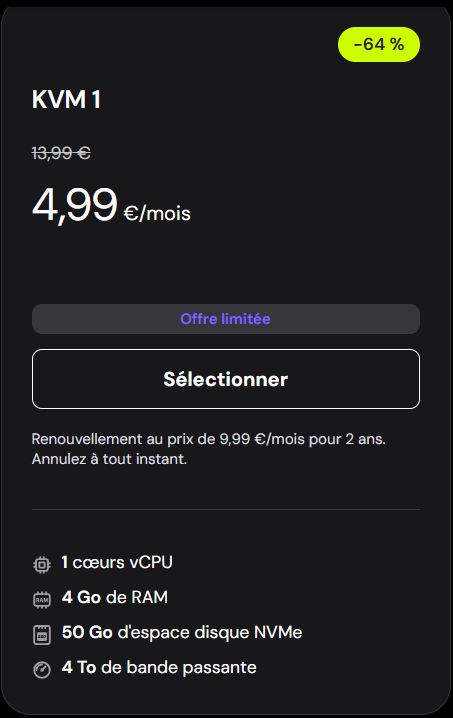
- Hostinger – KVM1 plan
- 4.99 € / month
- 1 vCPU
- 4 GB of RAM
It is not a large configuration, but it should be sufficient for my usage.
A nice bonus: the domain name is included, perfect to give the project a real URL.
Deployment architecture
For URL management, I chose Caddy.
The idea is simple:
/→ redirect to my blog/api→ my RAG API/swagger→ interactive API documentation
On the server side, I prepared a deployment directory with:
- the blog (Hugo)
- the API sources
- a
docker-compose.yml - the Caddy configuration
Everything was copied to the Hostinger VPS and installed… no particular issues, it is quite simple and well designed.
First shock: performance
On my Raspberry Pi 4, I had already noticed an issue: around 30 seconds to get a response.
According to Augment, the diagnosis was clear: the Raspberry was simply not powerful enough.
I therefore expected a clear improvement on the VPS.
First production test… disaster: still ~30 seconds, and not very good results 😬.
It was clearly time to dig deeper…
1. Performance and architecture (speed)
The problem
Initially, I was using a local embedding service:
- the .NET code called Python scripts
- the model was loaded on the fly
Result:
- the model was loaded for each request
- CPU saturation
- unstable application
At first, I thought the issue came from the database (poorly optimized queries, missing indexes, etc.).
After adding quite a lot of logs, the verdict was clear: the database was not the issue, but the generation of chunks and embeddings.
Analysis
Loading a deep learning model, even a “small” one like E5, is a heavy operation. Doing it for every request is completely inefficient.
What was needed was an architecture where the model stays “warm”, loaded only once in memory.
What was implemented
Dedicated microservice
An independent Python API, based on FastAPI, running in its own Docker container.Single model loading
Themultilingual-e5-smallmodel is loaded only once at service startup.HTTP communication
The .NET server now communicates via fast and simple JSON requests.
Result
Processing time went:
- from several seconds per chunk
- to a few milliseconds
Now things start to feel much better.
2. Search quality (SimilarityScore)
The problem
With the initial model:
- similarity scores around 0.60
- often poorly relevant results
- generic sections like “Errors to avoid” showing up all the time
In short, the AI struggled to understand MO5-specific technical nuances.
Analysis
Two main causes:
1. The model
The original model was not performant enough for:
- technical language
- multilingual content (French / English)
2. Loss of context
Once split into chunks, the engine:
- saw a list of instructions
- but forgot which document and which section they came from
For example, it no longer knew whether it was about:
- text mode
- or graphics mode
What was implemented
Model change
Switched tointfloat/multilingual-e5-small, the base score jumped from 0.61 to 0.86Semantic enrichment
The C# code was modified to inject:- the document title
- the section title
into each chunk sent to the AI
Markdown cleanup
Removal of characters like#,**, etc. to keep only “plain” text during indexing
Result
Technical documents now consistently rank number one for hardware-related queries (for example NMI).
The AI finally understands the global context of each page.
Empirical fine tuning
I ran many tests to refine the behavior:
- removing
#,*, etc. - chunk size
- overlap size
- order of contextual fields injected
Everything was done in an empirical way, through testing and comparisons.
Valuable help from AIs
I do not know much about neural models.
On that front:
- Gemini helped me a lot
- deploying the Python service
- choosing the
multilingual-e5-smallmodel
Honestly, without this help, it would have taken much longer (and probably been more painful 😅).
Testing the RAG in practice
To test the RAG concretely, the easiest way is to use the following site: 👉 https://retrocomputing-ai.cloud/
It is a blog page that explains step by step how to use the server via a coding agent (Copilot, Augment, etc.), relying on the MCP server.
If you just want to explore the API without using an agent, the Swagger documentation is available here: 👉 https://retrocomputing-ai.cloud/swagger
You will find the complete list of endpoints, request formats, and example calls to quickly test the RAG.
Current documentation status
The documentation used by the RAG is still being updated.
Following my latest explorations of the MO5 codebase, especially everything related to graphics modes, I am currently reviewing and enriching the documentation files.
This means that:
- some parts are already very precise (especially hardware-related)
- others will continue to evolve as content is added
- RAG results will keep improving as the documentation grows
In short, the server is operational, but the content it relies on is still alive (and that is also what makes the experience interesting).
Conclusion
This deployment helped me understand one essential thing:
A RAG that “works” is not necessarily a RAG that is usable.
Between:
- architecture
- performance
- embedding quality
- injected context
there are many parameters to adjust.
But once the right choices are made, the gain is immediate and really satisfying.
More in the next episode 🙂